

Schema Markup: The Invisible Code That Gets Your Business Found on Google
You searched for a plumber at 9 PM on a Tuesday. Not just any plumber. One near you, with good reviews, open right now.
Google handed you three options at the top of the page. Stars. Hours. Phone number. One click to call.
You picked the first one.
Here’s what you probably didn’t think about: why that business showed up with all that information while dozens of others appeared as plain text links — or didn’t appear at all. The answer isn’t luck, and it isn’t just about having a good website. It’s about speaking Google’s language. That language is called schema markup, and most local businesses in New Hampshire still aren’t using it.
What Schema Markup Actually Is (Without the Jargon)
Think of your website the way Google does. It’s a massive document full of words and images. Google has to read that document and figure out: Is this a business? Where is it? What does it do? Is it open right now? Are people happy with it?
Without any extra help, Google is making educated guesses.
Schema markup changes that. It’s a small block of code you add to your website that explicitly tells search engines what things mean, not just what they say. Your address isn’t just text on a page — it’s your business address. Your phone number isn’t just digits — it’s your customer service line. Your hours aren’t buried in a paragraph — they’re structured, machine-readable data that Google can display directly in search results.
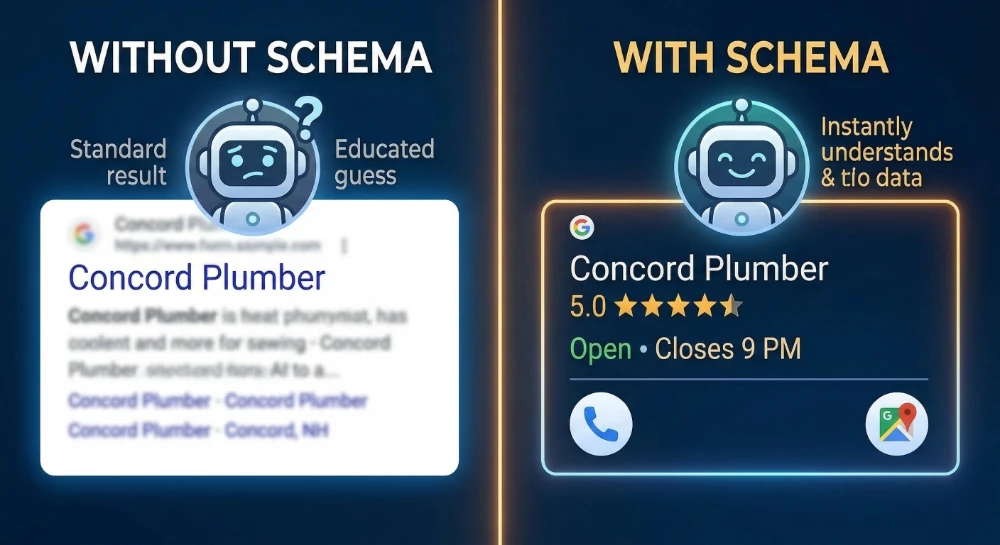
When your website speaks that language clearly, Google rewards you with what’s called a “rich result”: those enhanced listings with stars, hours, photos, and FAQs that take up far more space in search results than a plain link ever could.
Why This Actually Matters for Your Business
Here’s where it gets real. Studies consistently show that rich results get clicked 20 to 30 percent more often than standard blue links. Some research puts that gap even higher — rich results capturing clicks nearly 60 percent of the time compared to 41 percent for standard listings.
That’s not a minor difference. If your business currently gets 100 visitors a month from Google, better schema could realistically push that to 120 or 130 — without spending a dollar on ads.
The businesses that go all-in on this see even bigger returns. Healthcare and enterprise organizations have documented hundreds of percent increases in clicks after building out robust structured data. One healthcare system reported an 843 percent increase in clicks over a nine-month period. A technology company documented 400 percent growth from rich results alone.
These aren’t unicorn cases. They’re the result of doing something most competitors skip.
And there’s another reason this matters more now than it did two years ago. AI-powered search — Google Gemini, ChatGPT, AI Overviews — pulls heavily from structured data when answering local questions. When someone asks “what HVAC company is open on Saturdays near Concord, NH,” the AI has to get that information from somewhere. Businesses with clean, organized schema markup are the ones it trusts.
The Practical Starting Point: Your Business Identity Code
You don’t need to be a developer to understand what needs to be in your schema. Here’s what the core block should include for any local business.

- Your business name. It sounds obvious, but this needs to exactly match what’s on your Google Business Profile. Consistency matters — any mismatch confuses the algorithm.
- Your address. Not just your street. City, state, zip code, and country, all formatted cleanly. This is how Google anchors you to a physical location for “near me” searches.
- Your phone number. In international format: +1-603-555-5555. This makes it clickable from mobile search results, which is where most local searches happen.
- Your hours. Not as a text paragraph — as structured data with specific open and close times for each day. If you close for lunch, that needs its own entry. Holiday hours can be noted too, which protects you from someone driving to a closed location on Christmas Eve.
- Your category. This is where specificity pays off. Google doesn’t just want to know you’re a “business.” It wants to know you’re a Plumber, or a Dentist, or an HVACBusiness. The more specific your category matches what people are actually searching for, the better Google can match you to those searches.
- Your coordinates. Latitude and longitude, to five decimal places. This eliminates any ambiguity about exactly where you are — critical for proximity-based “near me” results on mobile.
The Things That Separate Good Schema from Great Schema
Once your foundation is in place, there are several additions that significantly increase your visibility and credibility.
- Customer reviews. Embedding your aggregate review score directly into your schema is what triggers those gold stars in search results. Google has strict rules here — you cannot mark up reviews you wrote yourself or collected on your own site without proper sourcing. But properly sourced review data, structured correctly, is one of the most powerful CTR boosters available.
- FAQ content. If your website includes a Frequently Asked Questions section (and it should), wrapping that content in FAQPage schema makes it eligible for accordion-style FAQ displays in search results. These take up enormous amounts of visual real estate. They also feed directly into AI-generated search answers, which means your business gets cited when someone asks a related question through Google’s AI features.
- Links to your other profiles. Schema includes a property called “sameAs” that lets you link your website to your Google Business Profile, Yelp page, Facebook, LinkedIn, and other directories. This tells Google that all those profiles are the same entity — you — which consolidates your authority across the web into a single, stronger signal.
- Photos. High-quality, crawlable images tied to your schema help your business appear in visual search results and local carousels.
A Special Note for Service Area Businesses
If your business goes to the customer rather than the other way around — plumbers, landscapers, IT support, mobile notaries — schema works a little differently for you.
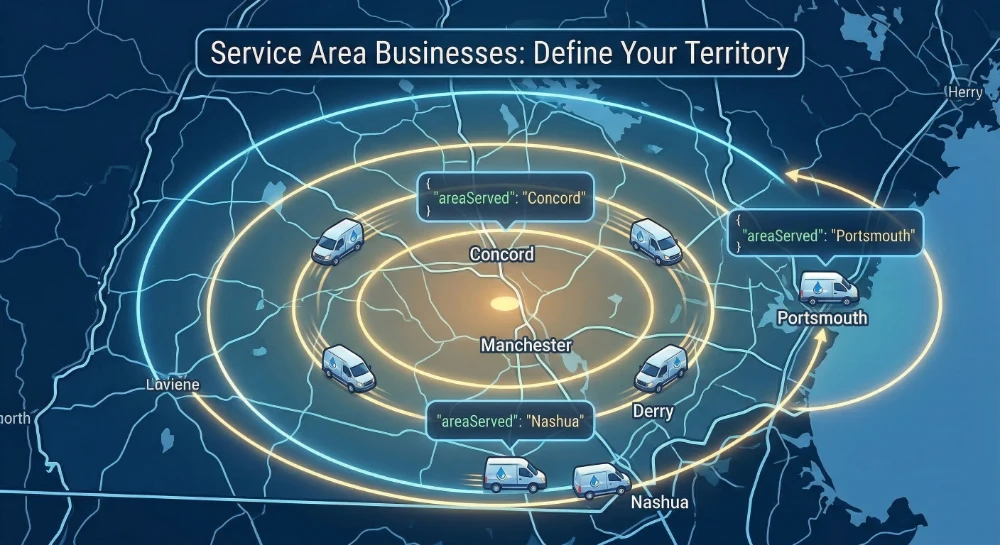
You don’t need a storefront address to show up in local search. What you need is an “areaServed” declaration in your schema, where you explicitly name the cities, towns, or regions you serve. You can list Manchester, Concord, Nashua, and Portsmouth individually. You can even define a geographic radius — say, 50 miles from your home base — that Google maps as your service territory.
This is how you show up in “near me” searches across multiple communities without having a physical location in each one.
How to Actually Implement This (Without Hiring a Developer)
If your website runs on WordPress, you’re in luck. Plugins like Yoast SEO and RankMath have schema tools built in. Yoast’s Local SEO add-on, in particular, handles much of the LocalBusiness schema automatically based on the information you enter into its settings. It’s not perfect, and it doesn’t cover every advanced use case, but for a single-location business, it gets you most of the way there.
For businesses on other platforms like Wix or Squarespace, built-in SEO tools handle some schema automatically, but they’re limited. You may need to add custom code blocks for more advanced structured data.
If you want to do it manually — or verify that your current setup is working — Google provides a free tool called the Rich Results Test (search.google.com/test/rich-results). Paste your URL in, and it tells you exactly what schema Google found, what’s working, and what’s broken or missing. Run this on your key pages every few months, especially after a site redesign.
After implementation, monitor the “Enhancements” section in Google Search Console. This is where Google reports how many of your pages are successfully generating rich results versus showing errors. Invalid markup — whether from a missing comma in the code or a data mismatch — will silently kill your rich results until it’s fixed.
The One Rule You Cannot Break
Everything in your schema markup must match what’s actually on your page. If your schema says you’re open until 8 PM but your website copy says 6 PM, Google will discard your structured data entirely. If you mark up reviews that don’t exist on your site, you risk a manual penalty. If you claim to be a local business but you only operate online with no service area, you’ll get flagged.
The most common ways businesses accidentally break this rule:
- Outdated hours in schema after a schedule change. You updated your website but forgot the code underneath. Google sees the conflict and stops trusting both.
- A phone number in schema that no longer routes correctly. This one hurts twice — you lose the rich result and you miss the call.
- Review markup for testimonials that only live on your own website. Self-sourced reviews without proper third-party verification trigger spam flags, not star ratings.
- Using a LocalBusiness tag for a business with no physical presence or defined service area. If you operate entirely online, the correct tag is Organization — not LocalBusiness.
- A site redesign that breaks the schema code. If your developer rebuilds the front end without accounting for structured data, your rich results can vanish overnight without a single error message.
Schema markup is a trust signal. Use it to accurately represent your business, and it builds authority over time. Misuse it, and the consequences are worse than not using it at all.
The Bottom Line
Schema markup is the invisible infrastructure of local search. Most of your competitors haven’t touched it. The ones who have are the ones showing up with stars and hours and click-to-call buttons while everyone else blends into a wall of plain links.
The technical barrier is lower than most people think. The impact is higher than most people expect.
If you want to know whether your site currently has schema markup — and whether what you have is actually working — that’s something we can check in a free performance assessment. No pitch. Just the numbers.
Brandit Marketing Solutions helps New Hampshire businesses show up where their customers are searching. Our PIXELS team handles local SEO, structured data implementation, and the full range of digital marketing that connects your business to the right people at the right moment.
- What Schema Markup Actually Is (Without the Jargon)
- Why This Actually Matters for Your Business
- The Practical Starting Point: Your Business Identity Code
- The Things That Separate Good Schema from Great Schema
- A Special Note for Service Area Businesses
- How to Actually Implement This (Without Hiring a Developer)
- The One Rule You Cannot Break
- The Bottom Line
Ready to Take Your Brand Beyond Ordinary?
Your marketing shouldn’t just exist. It should perform. If you’re done settling for “good enough,” let’s build something impossible to ignore. Brandit helps you connect every digital, physical, and promotional touchpoint into one unstoppable brand experience.
Real Results,
Real Reactions
What Our Clients Say

"I sent out three bids for my marketing needs for this year and Brandit was the most responsive and provided great ideas. One company I reached out hadn't even gotten back to me while the other wasn't even close to being comparable to Brandit's creativity, pricing and service."
"I have used Brandit for several projects and they always come through with fantastic pricing and customer service. I highly recommend them."
Southern New Hampshire University

"Thanks to Brandit's generous contribution to the Big Ideas for Building Independence Capital Campaign, Easterseals NH is now better able to serve people with disabilities or special needs. With your support, we raised nearly $2.6 million for renovations to our headquarters."
"It has been an incredible journey! We couldn't have done it without you, and wish to take this opportunity to thank you and your team at Brandit Marketing Solutions for all that you have done and your generous donation."
Easterseals, NH

"Bringing Brandit Marketing Solutions into the CMC-fold is the best thing and most appreciative thing I've done since being at the Hospital."
Catholic Medical Center
"Exceptional does not even begin to cover the work that these people do. I have worked closely with other marketing firms and Brandit tops them every time. From innovative ideas to customer service that rivals the best of the best. I just couldn't speak more highly of them."
Southern New Hampshire University

"The Granite Group, headquartered in Concord, NH, distributes plumbing, heating, cooling, water and propane supplies to contractors and fuel dealers across New England through over 45 wholesale branches and their Online Store. The company also operates 15 retail showrooms under The Ultimate Bath Store name.
Brandit is pleased to say that we have been working with the Granite Group for over ten years which happens to be almost as long as this company has been in existence. In 2020, TGG was named one of New Hampshire's best places to work."
The Granite Group
10+ Year Partnership

"Over my long career, I have been in a position where I have worked closely with numerous vendors/suppliers. I can honestly say that I have never engaged with a company that is as amazing and responsive as Brandit."
"A sincere thanks to the team for the hustle on getting our shirts and tradeshow materials done for our group! You really relieved our pressure and I know it wasn't an easy task. Your effort and turnaround time was and is appreciated. Believe me when I say that I do not take for granted the relationship we have built over the years. Your service is top notch."
C&S Wholesale Grocers

"For almost a decade, the team at Brandit delivered successful and effective marketing solutions, spearheaded the merchandising of the FIRST brand by creating one-of-a-kind products, built, hosted, and managed their very first ecommerce store supporting all programs, staff, partners, sponsors, teams, and customers globally.
In addition, Brandit set up and managed multiple on-site retail stores at their premier Championship events where we serviced over 65,000 attendees. Today we provide web services as well as branded merchandise for regional partners".
FIRST Robotics

"The Brandit Marketing Solutions Ltd Team is wonderful to work with and we appreciate what they do to make us look good! They have expanded their services in recent years to meet whatever marketing needs you may have…from apparel and giveaway items to video and web services to graphic design and printing services, even graphic enhancements for your interior/exterior office space."
"I have worked with this team since the founding of their company and look forward to many more years of working together!"
Boys & Girls Club of Manchester

"The Brandit team is a talented group of creative professionals that I've worked with for years. Top notch!"
Art Murphy
Our Insights
.

Brand Consistency: Make Your Site & Sign Match
Your website looks sharp. Your storefront sign looks fine. Your business cards came back a slightly different shade of blue than you remembered. Each one on its own seems like a small thing. Together, they cost you customers and money. Brand consistency is whether everything a customer sees from you looks and sounds like it…

Sustainable Promotional Products: A Buyer’s Reality Check
That recycled tote you ordered for the trade show has a problem. The product page called it eco-friendly, you felt good about the choice, and you moved on. Here is the uncomfortable part: when auditors actually test merchandise carrying self-declared green labels, close to half cannot back up the claim. The word on the page…

What Is AI Search Readiness and How Can Local Businesses Improve Visibility?
Your next lead may begin with an AI agent researching your company before a person ever visits your website or contacts your team. Google is expanding the ways its AI-powered Search tools can help people find and compare local providers. A customer can describe what they need, ask Google to research nearby businesses, and use…

Premium vs. Volume: Rethinking Your Promotional Products Budget
You order 500 pens for the trade show. They cost a little over a dollar each, they have your logo, and they feel like a responsible use of the budget. Three weeks later, most of them are in a junk drawer, a parking lot, or a trash can. A few never made it out of…

Holiday SEO Timeline: Why December Rankings Start in Summer
The businesses that dominate search results this December made their move back in July. Not out of habit. They moved early because search rewards steady, consistent work in a way that no last-minute push can replicate. Holiday SEO is not a campaign you switch on when the decorations come out. It is an advantage you…

Corporate Holiday Gifting Timeline: Why Q4 Planning Starts in July
Here is the part nobody tells you about corporate gifting: the best time to lock in your holiday program is right now, in July. Not October. Not “right after Halloween.” July. That sounds early enough to be a joke. It is not. The companies that run corporate gifting well, sending memorable and on-time gifts to…

Website Performance Audit: Why Q3 Beats Q4 Every Time
Your website traffic is about to drop. Vacations start, inboxes go quiet, and the steady hum of summer browsing replaces the urgency of buying season. Most businesses read that slowdown as a reason to coast. That is the expensive mistake. The quiet stretch from July through September is the best window all year to run…

Summer Foot Traffic: Win It With a Mobile-First Website
Picture a family on a sidewalk in Portsmouth on a Saturday in July. It is 86 degrees, the kids are hungry, and someone pulls out a phone and types “lunch near me.” Three places show up on the map. They tap the first one. If that site loads fast and the menu is right there,…

Modern Phishing Scams: What Smart Businesses Need to Know
The old advice for spotting a scam email no longer works. Watch for bad spelling, awkward grammar, and a generic greeting, and you were safe. That rule protected people for years. Modern phishing scams have erased every one of those tells. Attackers now write clean, personalized messages, hide their links inside images, and move the…

Branded Koozies and Sunglasses Aren’t Lazy: High-Yield Summer Promotional Products
Someone on your team just rolled their eyes at the idea of branded sunglasses. Too obvious. Too expected. Let’s do something clever instead, maybe a little desk gadget or a puzzle nobody asked for. That instinct feels smart. It usually costs you the campaign. Here’s the part most people miss: the “clever” item lives on…
Omnichannel Marketing Solutions
Merging creativity and technology for comprehensive brand experiences.

PIXELS
Harnessing digital platforms for impactful brand promotion and audience engagement through strategic touchpoints.

PROMOS
Making the intangible tangible through high-quality promotional items that echo your brand's voice and values.

PLACES
Transforming physical environments into powerful brand narratives that forge connections with everyone who enters your space.